

faq how to exclude words from a google search

How to exclude words from a Google search

how to exclude words from a google search, what is how to exclude words from a google search, how to exclude words from google search results, google search exclude operator, exclude certain words from google search, google search syntax exclude, how to refine google search

Key highlights

how to exclude words from a google search, how to exclude words from google, google search exclusion tips, remove words from google results, refining google searches, advanced google search techniques, precise google searches

Frequently asked questions

  • How do you remove words from Google search results?

    You remove words from Google search results by using the minus sign (-) operator directly before the unwanted word. This tells Google to filter out any pages containing that specific term, greatly narrowing your results. This method is quick, easy, and universally recognized by the search engine for more precise queries.

  • What is the symbol for excluding terms on Google?

    The symbol for excluding terms on Google is the minus sign (-). You place this operator immediately in front of any word or phrase you want to exclude from your search results. This directs Google to omit web pages that contain that specific content, helping you achieve more relevant and focused information.

  • Can I filter out multiple words from a Google search?

    Yes, you can easily filter out multiple words from a Google search. Simply place a minus sign (-) before each individual word you wish to exclude. For example, a search like 'best movies -horror -comedy' will remove results containing either 'horror' or 'comedy,' giving you a highly customized set of outcomes.

  • Is there a Google search setting to block words?

    No, there isn't a specific Google search setting to permanently block words. Instead, you apply the exclusion operator directly within your search query each time you want to filter results. This allows for flexible and context-specific blocking, adapting to your unique search needs without fixed settings.

  • Does excluding words improve search accuracy?

    Yes, excluding words significantly improves search accuracy by removing irrelevant or ambiguous content. When you specify terms to omit, Google can better understand your intent and return results that more closely match what you are looking for. This precision saves time and delivers more useful information.

  • What are some common uses for excluding search terms?

    Common uses for excluding search terms include differentiating between homonyms, such as 'apple -fruit' for the company. It also helps remove common but irrelevant keywords, like 'recipe -blog' for direct cooking instructions. This method is perfect for avoiding noise and focusing on specific aspects of a broad topic.

  • Will excluding words affect my Google search history?

    Excluding words in your search query will not negatively affect your Google search history. The excluded terms are simply part of the query you submit. Google records the full search string, including any minus signs, but it does not store separate information about which words you specifically avoided. It's just part of your search record.

Story

When you need to narrow down your online research, knowing how to exclude words from a Google search becomes essential. This simple yet powerful method helps you eliminate irrelevant results, directing you to the exact information you are seeking.

Understanding How to Exclude Words from a Google Search

Excluding words from your Google searches involves using a specific operator that tells Google to omit any pages containing that particular term. This technique is invaluable for anyone who frequently searches for information online and struggles with too many unrelated results.

For instance, if you are looking for information about

Summary

Knowing how to exclude words from a Google search is a fundamental skill for more effective online information gathering. This powerful technique lets you refine your search queries by telling Google to ignore specific terms, thus eliminating irrelevant results and saving you valuable time.

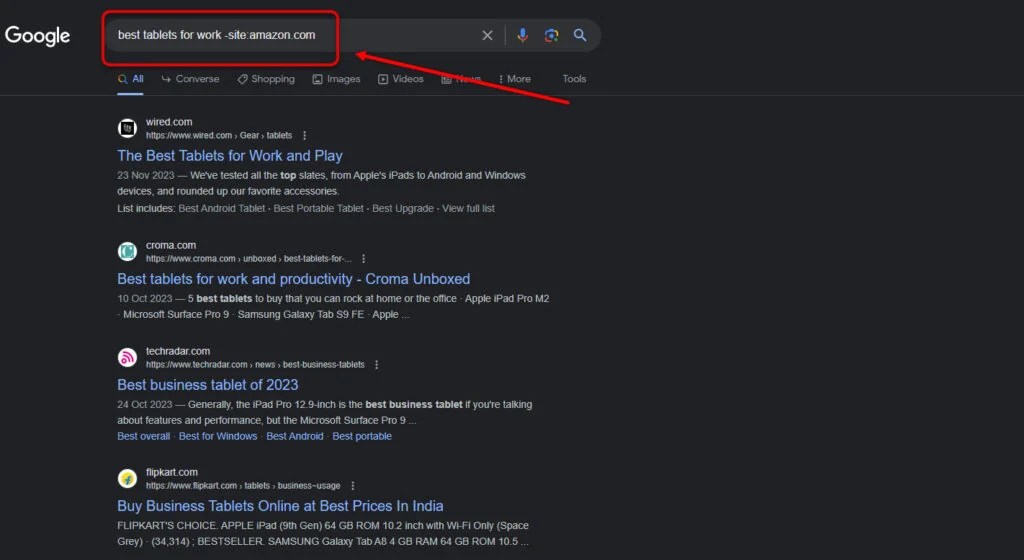
For a US citizen, using this method is straightforward and accessible without any cost. Simply type your search query into the Google search bar, and add a minus sign directly before any word or phrase you wish to remove from the results. For example, a search for “apple -fruit” would show results about the company, not the food item. This simple adjustment vastly improves the precision of your searches.

The next action a US reader should take is to apply this knowledge immediately in their daily online activities. Head to Google.com, input your next query, and experiment with the minus sign operator. You will quickly discover how this easy step can lead to much more accurate and helpful search outcomes, making your digital experience smoother and more productive.

Learning how to exclude words from a Google search is a key skill for any US internet user seeking more precise information. This technique helps you filter out irrelevant results, making your online research much more efficient. By understanding how to apply a simple operator, you can significantly refine your search queries. There is no cost involved in using this feature, as it is a standard part of Google's search functionality available to everyone. Knowing how it works ensures you get straight to the facts you need. The next action a US reader should take is to practice this method immediately to see its impact.
how to exclude words from a google search, what is how to exclude words from a google search, how to exclude words from google search results, google search exclude operator, exclude certain words from google search, google search syntax exclude, how to refine google search

What is the primary method to exclude words from a Google search?

The primary method to exclude words from a Google search involves using the minus sign operator directly before the word you wish to omit. This simple character tells Google's algorithms to remove any search results that contain the specified term, making your results much more focused and relevant to your actual query. It is a quick and effective way to clean up your search output.

Why would someone need to exclude words from a Google search?

People often need to exclude words from a Google search to eliminate ambiguity or unwanted topics from their results. For example, if you are searching for information about a specific animal but keep getting results about a sports team with the same name, excluding the team's name will resolve this issue. This helps users bypass noise and get directly to the information they intended to find.

Can you exclude phrases, not just single words?

Yes, you can absolutely exclude phrases, not just single words, when using how to exclude words from a Google search. To do this, simply place the minus sign operator directly in front of the entire phrase, which should be enclosed in quotation marks. This instructs Google to filter out any results containing that specific string of words, allowing for even greater precision in your search. It is a powerful way to refine your query.

Does capitalization matter when excluding words?

No, capitalization does not matter when using how to exclude words from a Google search. Google's search engine is generally not case-sensitive for operators or search terms. Whether you type -apple or -Apple, the result will be the same; pages containing